College is expensive. Like, really expensive.
According to College Board, students can expect to spend around $3,016 a month on living expenses alone for the 2025-26 school year. That’s before tuition. So every dollar you can stretch—or earn—matters.
That’s where student discount apps and cash back tools come in. Your student status unlocks savings that most people don’t even know exist. And if you play your cards right, you can combine discounts, cash back, and rewards to save serious money throughout your college years.
In this guide, you’ll find the best student discount apps and cash back platforms to help you spend less—and one platform that actually helps you earn extra cash on the side.
Key Takeaways
- Student discount apps like UNiDAYS and Student Beans are free and unlock savings at hundreds of brands—from Apple to Spotify to Nike.
- Cash back apps like Rakuten and Ibotta reward you for purchases you’re already making, putting real money back in your pocket.
- Stacking a student discount with a cash back app can save you significantly more on a single purchase.
- KashKick goes a step further—it pays you to play games, take surveys and claim deals, giving you a real way to earn extra cash in your free time.
- Using a mix of these tools takes minutes to set up and can save (or earn) you hundreds over the course of a semester.
Why Student Discount Apps and Cash Back Are Worth It
Student discounts are one of the most underutilized financial perks out there. Most students don’t realize how many brands offer exclusive deals just for showing a valid .edu email or student ID.
Think 10–60% off software, streaming services, tech, clothes, food and more. According to Education Data Initiative, college students represent a consumer market worth roughly $593 billion. Brands know this—which is why so many of them offer exclusive deals to win student loyalty early.
Cash back apps take it a step further. Instead of just discounting what you pay, they give you a percentage of your purchase back as real money. Stack the two together—student discount plus cash back—and you can double (or triple) your savings on a single transaction.
Best Student Discount Apps and Cash Back Tools
Here are the top apps to help you save, earn and make the most of your student status.
Turn Your Free Time Into Extra Cash With KashKick
Before we get into discount apps, here’s something worth knowing: you can actually earn money on your phone—not just save it.
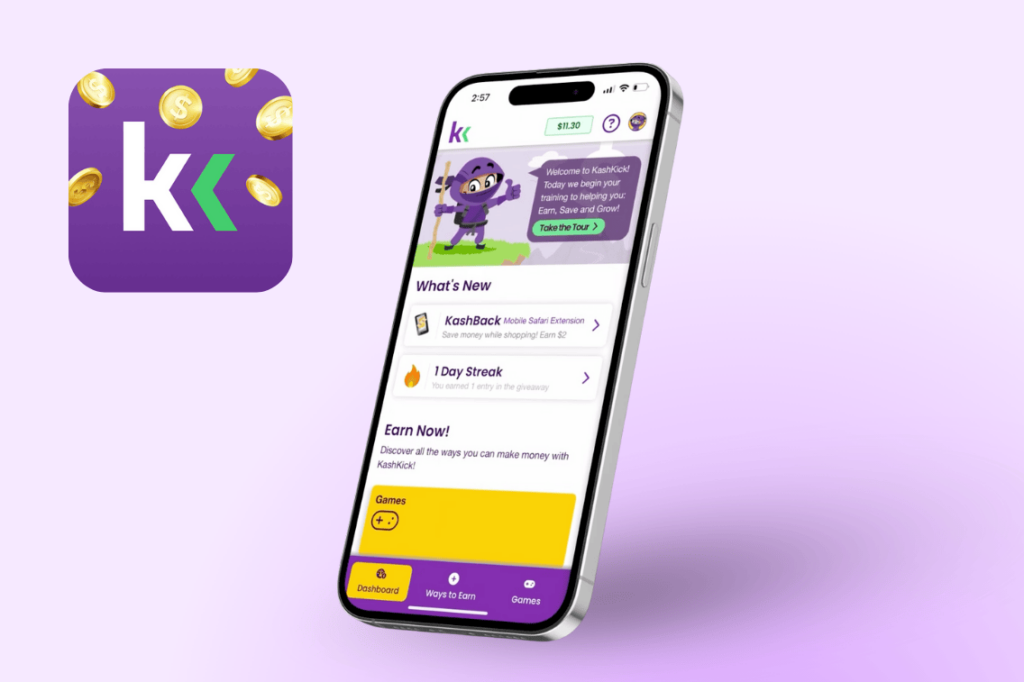
KashKick is a free rewards platform that pays members to play games, take surveys, try new apps and claim deals. It’s not a discount app in the traditional sense, but it’s one of the most practical ways for students to earn extra cash in their free time.
Offers are subject to change and may vary.
Here’s how it works through KashKick: you browse available offers, complete them (like reaching a certain level in a mobile game or trying a new service), and earn rewards directly to your KashKick account. Once you hit $10, you can cash out to PayPal, grab a gift card or even donate to charity.
One KashKick member, a 55-year-old self-described “Average Joe,” earned over $500 in less than a year just by playing games and taking surveys. Imagine what you could do with that extra cash between classes.
Kayla Pigan, who signed up for KashKick in early 2024, earned over $1,210 in less than two years—mostly through KashBack and games. “The extension makes it easy to earn extra money without doing anything as long as it’s active while I shop,” she said. When she’s ready to cash out, it takes just 1–3 days to hit her PayPal.
Key features:
- Earn real cash—not points—through games, surveys, deals and shopping
- Low cashout minimum ($10)
- Fast payouts (1–3 business days via PayPal)
- Lucrative referral program: earn 25% of your friends’ game and deal rewards
- Available on iOS and Android
Best for: Students who want to turn screen time into actual income.
👉 Sign up for KashKick for free and start earning today.
Get Verified Student Discounts Across Hundreds of Brands With UNiDAYS
UNiDAYS is the biggest player in the student discount space. Verify your student status once with your .edu email, and you unlock savings at 800+ brand partners.
Notable deals include Apple education pricing, Nike (10% off), Samsung (up to 30% off), ASOS (10% off) and Adobe Creative Cloud (60%+ off). The interface is clean and easy to browse by category. If you install only one discount app, make it this one.
Key features:
- 800+ brand partners across tech, fashion, food and more
- Free to join; verify with a .edu email or enrollment documents
- Works in stores and online
- Available on iOS and Android
Best for: Students who want one-stop access to the widest range of verified student deals.
Unlock Exclusive Deals You Won’t Find Elsewhere With Student Beans
Student Beans is UNiDAYS’ main competitor, and the two are worth having side by side. Student Beans tends to have stronger deals in fashion and food categories, with exclusive partnerships at places like Foot Locker and Papa John’s.
It also features a “Beans” rewards system where you earn points for using discounts, redeemable for gift cards. Signing up is free, and verification is quick.
Key features:
- 1,000+ brands with exclusive offers
- Strong fashion and food category deals
- Digital student ID usable in stores
- Available on iOS and Android
Best for: Students who want deals that complement (not duplicate) what UNiDAYS offers.
Earn Cash Back on Every Online Purchase With Rakuten
Rakuten is a cash back app with deals at 3,500+ stores—and it’s completely free to use. Shop through the app or browser extension, and a percentage of your purchase comes back to you as real cash.
Examples include 12% back at Sephora and Chewy. Rakuten also has in-store cash back when you link deals to your credit card. Cash back is paid quarterly (when you earn at least $5.01) via PayPal or check.
Rakuten is a great tool for stacking savings—apply a student discount, then run the purchase through Rakuten for an extra percentage back.
One thing to note: Rakuten pays out quarterly, so you won’t see your cash back for weeks or months depending on when you earn it. If you want faster access to your earnings, KashKick is a strong alternative—payouts process in 1–3 business days via PayPal or Venmo once you hit $10.
Key features:
- 3,500+ partner stores
- Browser extension makes it easy to use automatically
- $5.01 minimum to cash out
- Quarterly payouts via PayPal or check
Best for: Students who shop online regularly and don’t mind waiting for a quarterly cash back payout.
Get Rewarded Every Time You Grocery Shop With Ibotta
Groceries are one of the biggest recurring expenses for college students. Ibotta helps take the sting out by giving you cash back on grocery and retail purchases at 3,000+ retailers—including Walmart, Target and Kroger.
Here’s how it works: Browse offers in the app before you shop, make your purchases, then submit your receipt (or link your loyalty card). Cash is typically credited within 24 hours. Once you reach $20, you can cash out to your bank account or for a gift card. Ibotta says the average user earns $261 per year.
Key features:
- Works at 3,000+ retailers
- Cash back on groceries, drugstores, online shopping and more
- $20 cashout minimum via gift card or bank account
- Available on iOS and Android
Best for: Students managing their own grocery and household budget who want consistent cash back.
Get Huge Savings on Software and Subscriptions With ID.me
ID.me is a verification platform that many brands use to confirm student status and unlock discounts. While it’s not a discount app itself, it’s essential—it’s the gateway to savings at brands including Lenovo (5% off storewide), HP (up to 40% off) and many others.
Setting up your ID.me profile takes a few minutes, and once verified, you can use it across dozens of partner brands without re-verifying every time.
Key features:
- Secure identity verification accepted at many major brands
- Free to set up
- One-time verification, reusable across partner sites
Best for: Students who want a verified digital ID that unlocks discounts across multiple platforms.
Score Free Prime and Savings With Amazon Prime Student
Amazon Prime Student offers one of the best student discounts out there. For $7.49/month (or $69/year), students get all the perks of Prime—free two-day shipping, Prime Video, Prime Music and more—at half the standard price.
New members also get a free six-month trial. For students ordering textbooks, school supplies or home essentials, the shipping savings alone can make it worth it.
Key features:
- 50% off Amazon Prime membership for verified students
- Free six-month trial to start
- Includes free two-day shipping, Prime Video, Prime Music and more
Best for: Students who already order from Amazon regularly and want to cut the membership cost in half.
Save on Music and Streaming With Spotify Student
Spotify offers one of the most popular student discounts in the subscription space. Students pay $5.99/month for Spotify Premium—a significant discount from the standard $11.99 price—and the plan includes access to Hulu (with ads) as a bundle.
Verify your enrollment through SheerID, and you’re good to go. The discount applies for up to four years, or for as long as you’re enrolled.
Key features:
- Spotify Premium for $5.99/month (vs. $11.99 standard)
- Includes Hulu (with ads)
- Verified through SheerID; valid for up to four years
Best for: Students who want premium music streaming without the premium price tag.
Get Free Shipping on Takeout With DoorDash DashPass for Students
Food delivery is a college staple. DoorDash offers a DashPass Student plan for $4.99/month—that’s roughly half the standard rate. The plan includes $0 delivery fees, exclusive savings, discounts on Lyft rides and cash back on pickup orders.
For students who order delivery regularly, the monthly savings on delivery fees can easily exceed the cost of the membership.
Key features:
- DashPass for $4.99/month (standard plan is $9.99/month)
- $0 delivery fees on eligible orders
- 5% DoorDash credits on eligible pickup orders
- Requires student verification
Best for: Students who order food delivery often and want to reduce fees.
Save Big on Creative Software With Adobe Creative Cloud for Students
If you’re in a design, photography, marketing or media program, Adobe Creative Cloud is non-negotiable. The student pricing makes it significantly more accessible: Students pay $19.99/month for Creative Cloud Pro, compared to $69.99/month at the standard rate.
That includes Photoshop, Illustrator, Premiere, Acrobat Pro and more—the full suite for less than a third of the standard price.
Key features:
- Creative Cloud apps for $19.99/month (vs. $69.99/month standard)
- Verify through your .edu email or institutional login
- Discount applies for the first year then $39.99/month after that
Best for: Design, media, photography and marketing students who need professional-grade creative tools.
Get Free or Discounted Microsoft 365 With Your Student Email
Many colleges and universities provide Microsoft 365 completely free to enrolled students through their institution. If yours doesn’t, you can still access Microsoft 365 Premium and LinkedIn Premium Career for free for 12 months. (Note this is a limited-time deal, so check the details.)
This includes Word, Excel, PowerPoint, Teams and more—with Microsoft’s Copilot AI built in to help boost your productivity.
Key features:
- Free through many universities; check your school’s IT department
- Get one year free for a limited time
- Includes the full Office suite plus 1TB of cloud storage
Best for: Every college student. Seriously—check if your school covers this before paying for it.
Save on Gas and Groceries Every Time You Fill Up With Upside
Gas adds up fast, especially if you’re commuting to campus or heading home on weekends. Upside is a free cash back app that helps you save every time you fill up—no coupons, no loyalty cards, no hassle.
Here’s how it works: Open the app, claim a cash back offer at a nearby gas station, pay normally and Upside automatically tracks and credits your account. Users earn an average of around 10 cents per gallon back on gas, with offers also available at thousands of restaurants and grocery stores across the country.
And here’s a bonus for new members: If you sign up for Upside through KashKick, you may be able to earn a KashKick reward on top of your gas savings. Check KashKick’s Deals tab to see if the offer is currently available. Offers are subject to change and may vary.
Key features:
- Cash back on gas, groceries and restaurants at tons of locations
- Earn an average of ~10¢/gal back on gas
- No minimum to cash out; withdraw to PayPal, bank or gift card
- Potential KashKick bonus when you sign up through KashKick’s Deals tab
- Available on iOS and Android
Best for: Students with a car who want to consistently save on gas and everyday errands.
How to Stack Student Discounts and Cash Back for Maximum Savings
Using these apps together multiplies your savings. Here’s how to do it.
- Step 1: Check UNiDAYS or Student Beans first. Before any purchase, open one (or both) to see if a student discount exists. For big purchases like laptops or software, this alone can save you hundreds.
- Step 2: Run the purchase through a cash back app. After applying the student discount, go through KashKick, Rakuten or Ibotta (depending on the retailer) to earn a percentage back on top of your discount.
- Step 3: Pay with a student credit card. Some student credit cards offer 1–2% back on purchases. Combined with a student discount and cash back, a single transaction can return 15–20% in total savings.
- Step 4: Use KashKick to earn in between. While waiting on cash back to process or saving up for your next purchase, use KashKick to earn extra money by playing games, taking surveys or claiming deals. It’s one of the few tools that adds cash to your balance—not just subtracts from your spending.
Here’s a real-world example: On a $100 Nike purchase, you could save 10% from a student discount, earn 3–8% back through Rakuten, and add another 1–2% from a cash back credit card—totaling up to $16.50 saved on a single purchase in about 30 extra seconds.
How to Avoid Scams When Using Money-Saving Apps
Not every app promising savings or rewards is legit. Here’s what to watch for:
- Check ratings and reviews. Stick to apps with strong Trustpilot and app store ratings and real user reviews. (Check out these KashKick reviews)
- Avoid apps that charge fees to sign up or cash out. Legitimate apps like those listed here are free to join.
- Read the payout terms carefully. Understand how much you need to earn before you can cash out and how long it takes.
- Be skeptical of “earn $1,000 a week” claims. Realistic cash back and rewards apps help you save or earn a meaningful side income—not replace a job.
For more intel, study up on these financial scam red flags.
Start Saving (and Earning) More Today
Your student status is worth more than library access and a gym pass. With the right combination of student discount apps and cash back tools, you can meaningfully cut your monthly expenses—and with KashKick, you can add to your income at the same time.
The best part? Most of these apps take minutes to set up. Download UNiDAYS and Student Beans for instant access to hundreds of brand discounts. Add Ibotta for cash back on grocery runs. And sign up for KashKick to turn your free time into real money.
Every dollar you save—or earn—adds up. Start making your phone work for you.
👉 Sign up for KashKick today and start earning real cash in your free time.
FAQs: Student Discount Apps and Cash Back
What are the best student discount apps?
UNiDAYS and Student Beans are the top two student discount apps, giving you access to hundreds of verified deals at brands like Apple, Nike, Adobe and Spotify. Both are free, and it’s worth downloading both since they have different brand partnerships. For students who also want to earn cash (not just save it), KashKick is a great complement.
Can you really earn cash back as a student?
Absolutely. Cash back apps like Rakuten and Ibotta give you a percentage of your purchases back as real money. You can stack those earnings with student discounts for even bigger savings.
What is the best app for college students to make extra money?
KashKick is one of the best options for students looking to make extra cash in their free time. You can earn money by playing games, taking surveys and claiming deals—all from your phone. Once you hit $10, you can cash out through PayPal or Venmo. It’s low-effort, flexible and doesn’t require any special skills.
Do student discounts stack with cash back apps?
Yes—and this is one of the smartest moves you can make. Apply a student discount first (through UNiDAYS or Student Beans), then shop through a cash back platform like Kash to earn a percentage back on the discounted price. Some purchases can return 15–20% in total savings when you stack both.
How do I verify my student status for discount apps?
Most apps—including UNiDAYS, Student Beans and Spotify—verify your student status through your .edu email address or enrollment documents. ID.me is another verification platform used by many brands. Verification typically takes just a few minutes and lasts for 12 months before you need to re-verify.